Never lose a thread again.
You run an agent inside Elpis, and it becomes Elpis.
Elpis is an open-source fork of OpenAI's Codex CLI that keeps the proven execution foundation while adding explicit context control, durable continuity, auditable pruning, and provider-neutral ownership around the model loop.

Linux verification License Telemetry
Install • Features • Evaluation • Docs
Contents
Quickstart
Linux x86_64 preview:
curl -fsSL https://raw.githubusercontent.com/MasihMoafi/Elpis/main/scripts/install-elpis.sh | bash && ~/.local/bin/elpisThe installer picks the right binary for your machine and installs RTK, which powers shell-output filtering. On first launch, choose a provider and sign in or enter its API key.
v0.1.2 is the current release.
What is Elpis
Elpis is a provider-neutral coding-agent environment. The selected model or runtime performs inference; Elpis owns the surrounding working state: context admission, continuity, memory, permissions, tools, evidence, and the terminal interface.
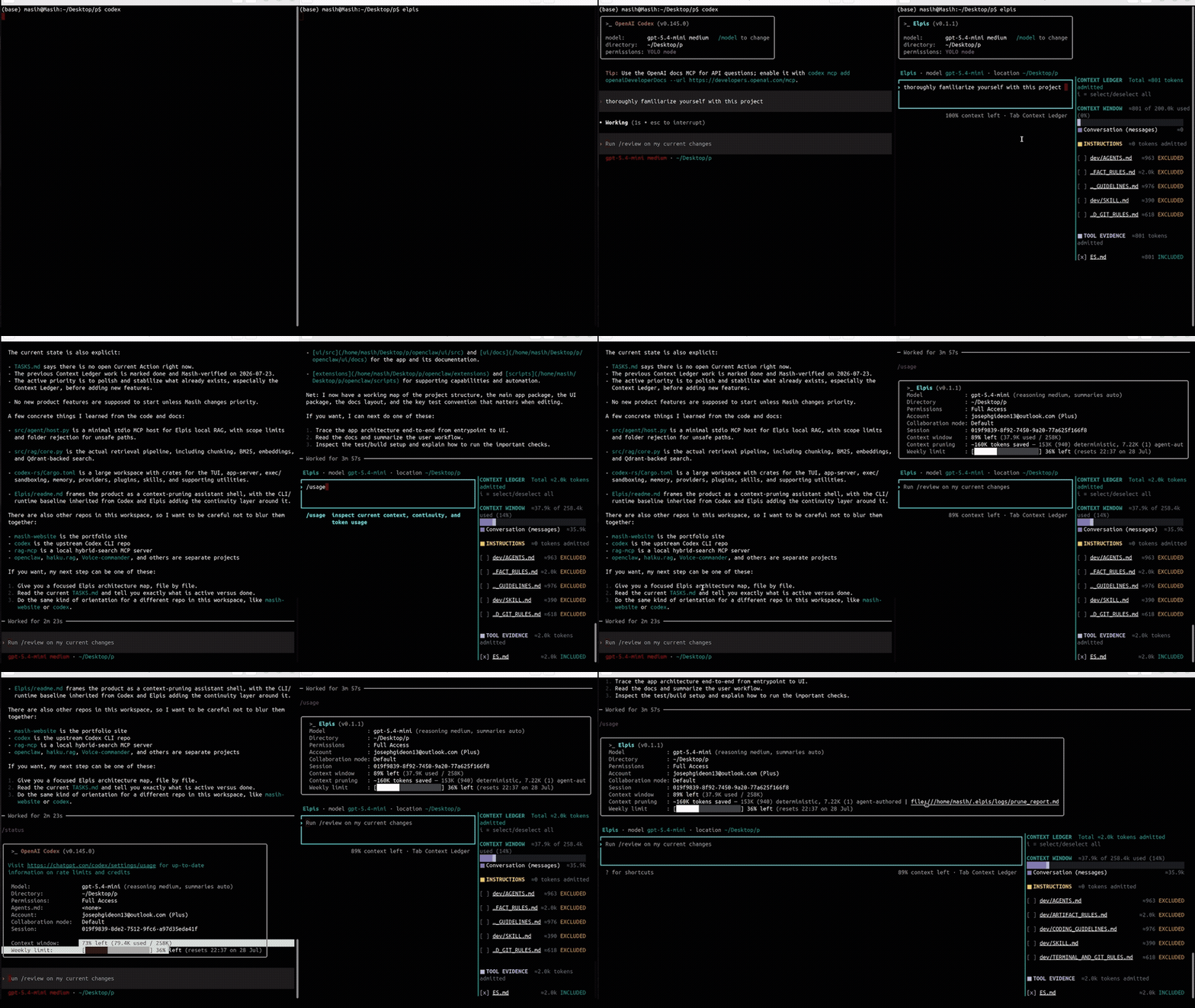
It starts from OpenAI's Apache-2.0 Codex CLI and preserves its execution foundation — terminal UI, patches, permissions, sandboxing, sessions, and tool lifecycle — while adding a continuity- first control layer around it. Change the provider without throwing away the project context. Nothing about the project has to be explained twice.
Different paths. Same roots. One shared project.
Why Elpis
Long sessions fill up with transcripts, file reads, searches, command output, and dead ends. The useful state gets buried in the story of how the agent reached it, while every request pays for more context.
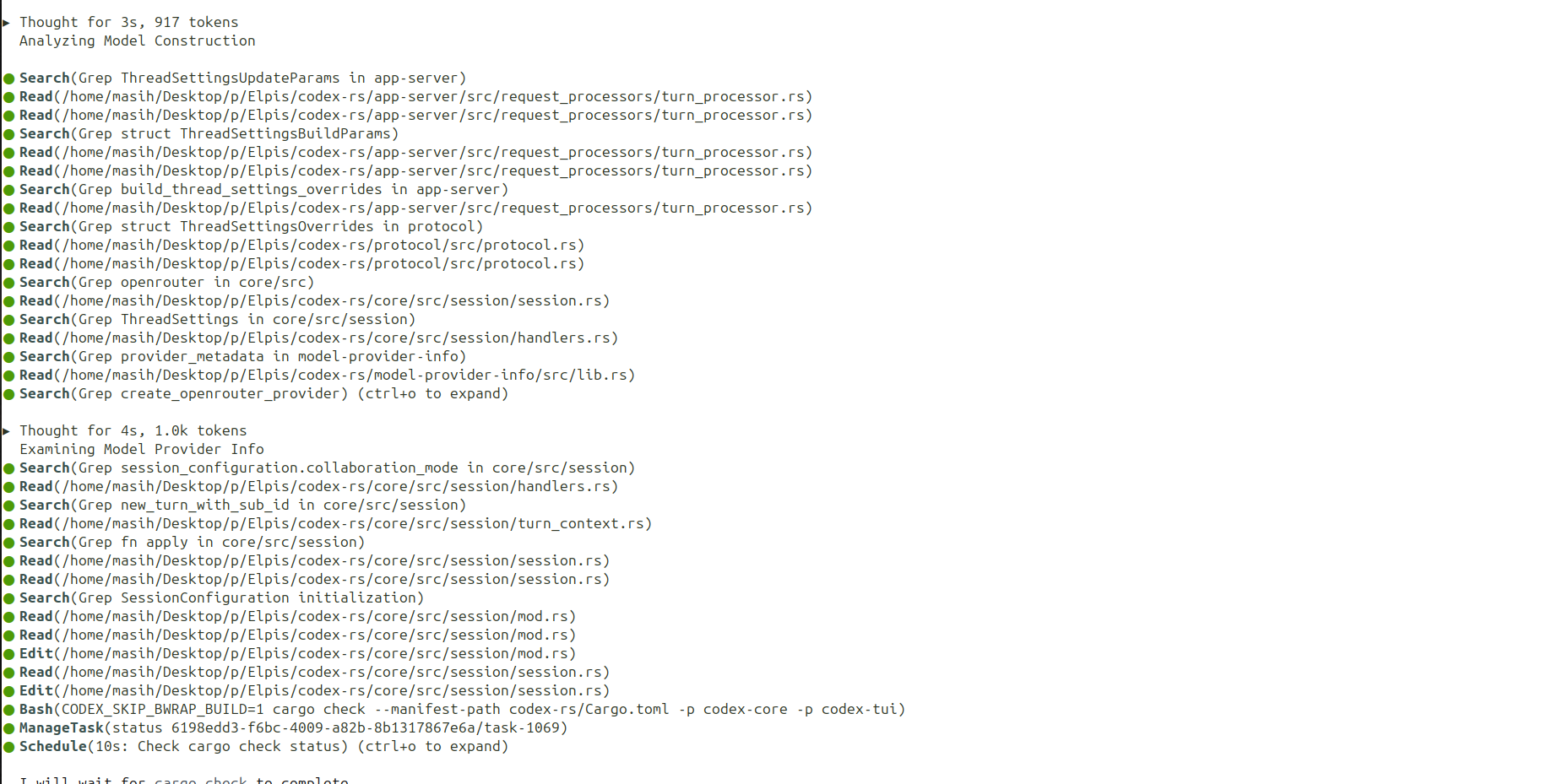
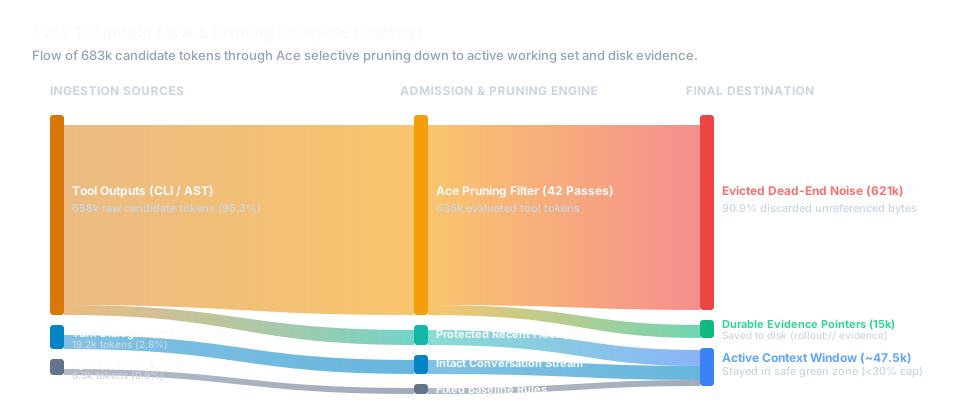
Elpis separates the active working set from durable evidence. The next request receives a small, inspectable context; the exact record stays on disk and can be retrieved when it is needed.
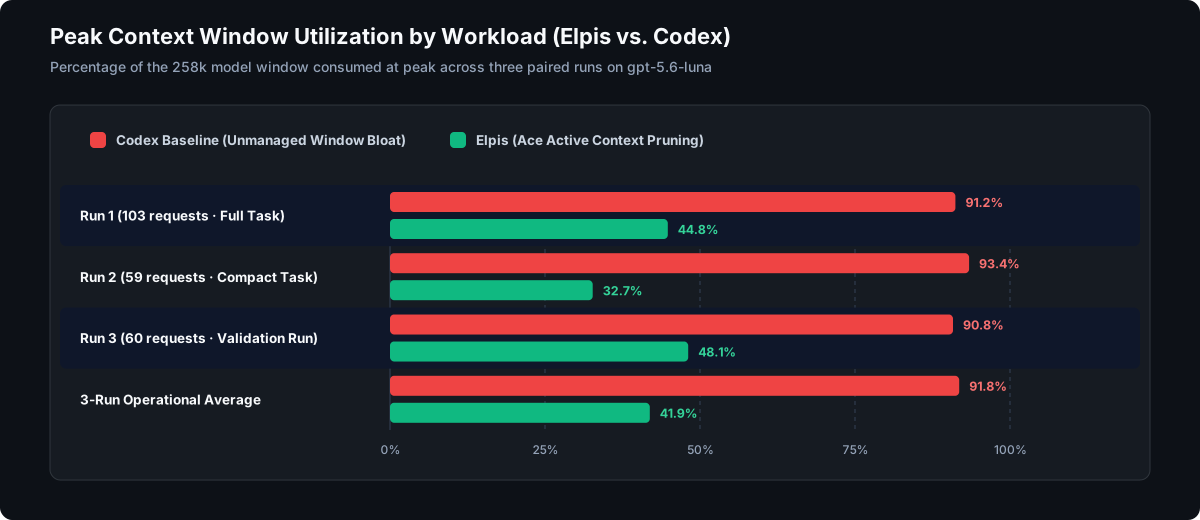
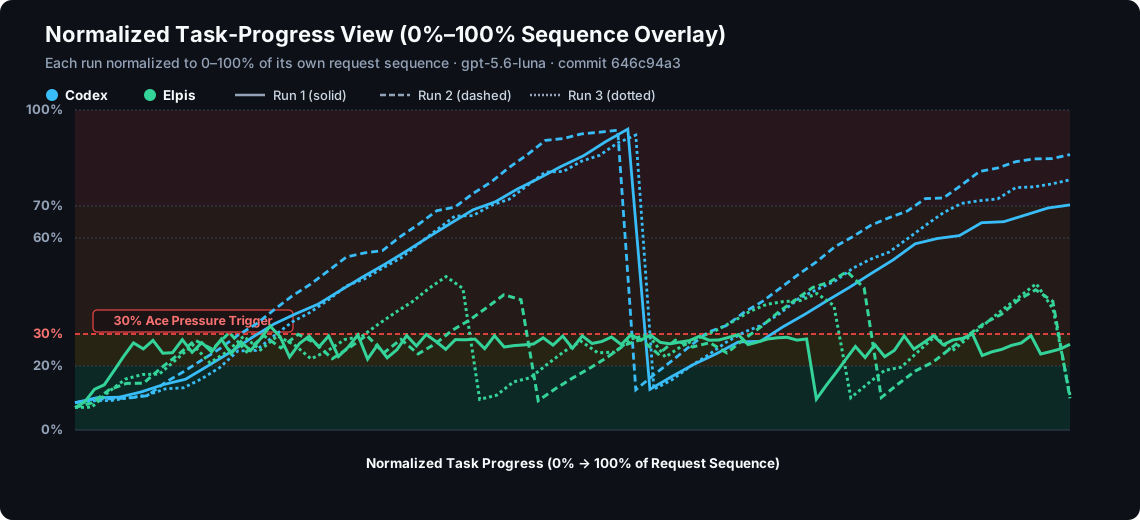
Three paired configured historical runs with automatic pruning enabled under the superseded high-frequency setup used one byte-identical prompt, the same model, and the same source commit on both arms. In those runs, peak context per request fell 47–65%; median context stabilized at 26.6–27.1%. Codex peaked above 90% of the window in each run, while Elpis stayed safely bounded in the green zone.
Elpis never modifies a model's own output or a request already in flight. Pruning rewrites only harness-supplied tool output, using a separate model instance sequenced against the main agent.
Core Features
Context engineering
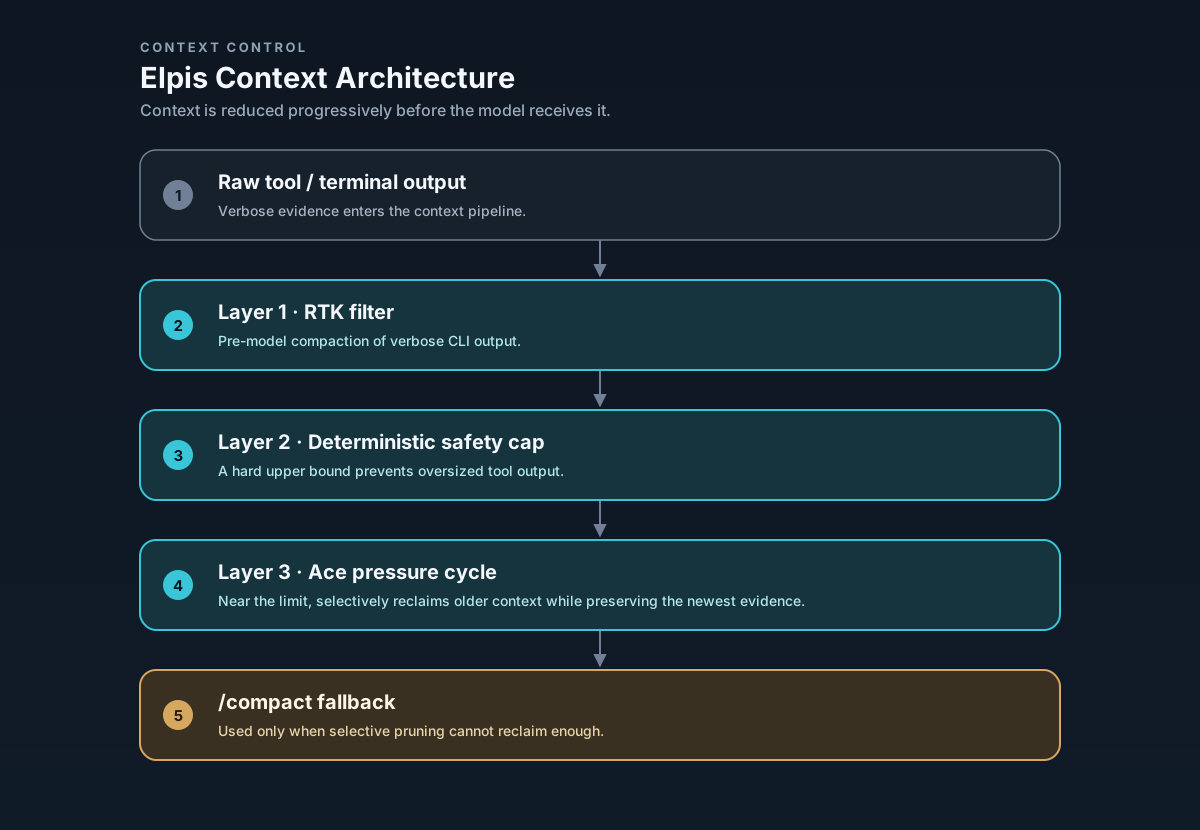
Context is a budgeted working set, not a dumped transcript. Elpis makes admission visible and uses a layered pipeline to keep useful findings while removing disposable exploration:
| Layer | What it does | When |
|---|---|---|
| 1. RTK shell-output filtering | Compacts supported command output before it reaches the model. | Before the agent sees it |
| 2. Deterministic safety cap | Bounds exceptionally large tool results. This is inherited from Codex. | Before the agent sees it |
| 3. Ace pruning — Experimental | Selectively rewrites eligible old tool evidence toward a safe working-set target, preserving the latest context and an evidence pointer. | Manual /prune or /force-prune; automatic pressure cycling only in a conversation started with the default-off setting enabled |
/prune and /force-prune are explicit manual Ace actions and do not rewrite user instructions, assistant messages, or model reasoning. /compact immediately runs Codex native compaction; it is independent of Ace pruning. Automatic native compaction uses the model-window threshold and usable-window headroom. Automatic Ace pruning is Experimental and off by default; /settings saves its value for the next conversation.
What a pruning decision looks like
One real pass from disk. A search command whose raw output ran to 18,930 characters — close to 5,000 tokens carried across requests:
Before — what the model was carrying:
Script completed · Wall time 0.1 seconds · Output:
tui/src/external_agent_config_migration.rs:800: item_type: …ItemType::AgentsMd,
tui/src/external_agent_config_migration_flow.rs:75: …ItemType::AgentsMd
tui/src/theme_picker.rs:283: fn theme_picker_subtitle(home: …) -> String
tui/src/theme_picker.rs:392: subtitle: Some(theme_picker_subtitle(
tui/src/theme_picker.rs:605: let subtitle = theme_picker_subtitle(…, Some(200));
tui/src/theme_picker.rs:617: let subtitle = theme_picker_subtitle(…, Some(140));
tui/src/app_event.rs:152: OpenAgentPicker,
… roughly two hundred more lines of the same shape …After — what the model carries on the next request:
[Ace pruned 231 lines of ripgrep output (18,930 chars → 248 chars).
Findings:
- Found ItemType::AgentsMd in external_agent_config_migration.rs:800
- Found theme_picker_subtitle definitions in theme_picker.rs:283,392,605,617
- Full raw output preserved in rollout evidence: rollout://sess-01j8/tool-14.log]Context Ledger and observability
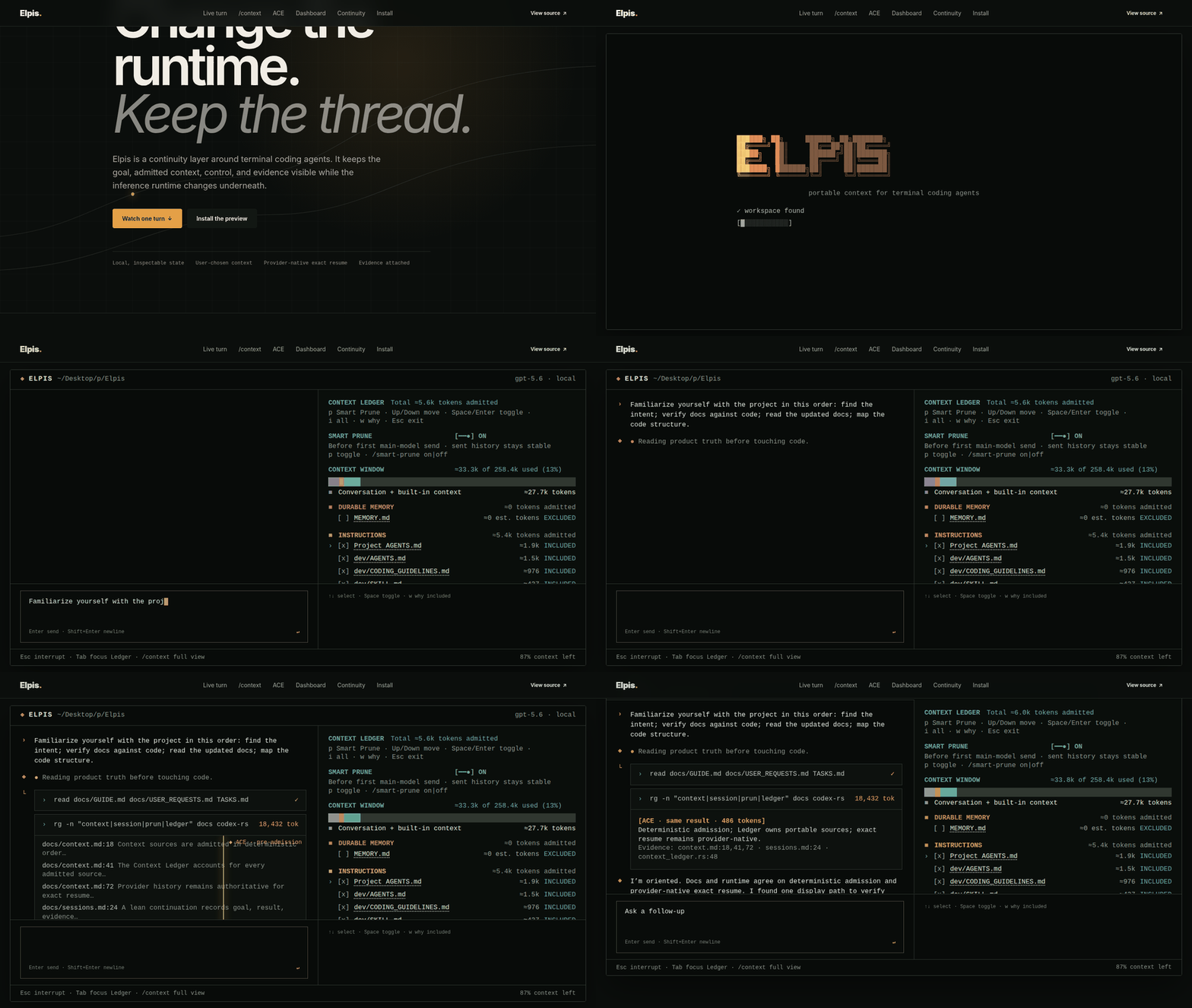
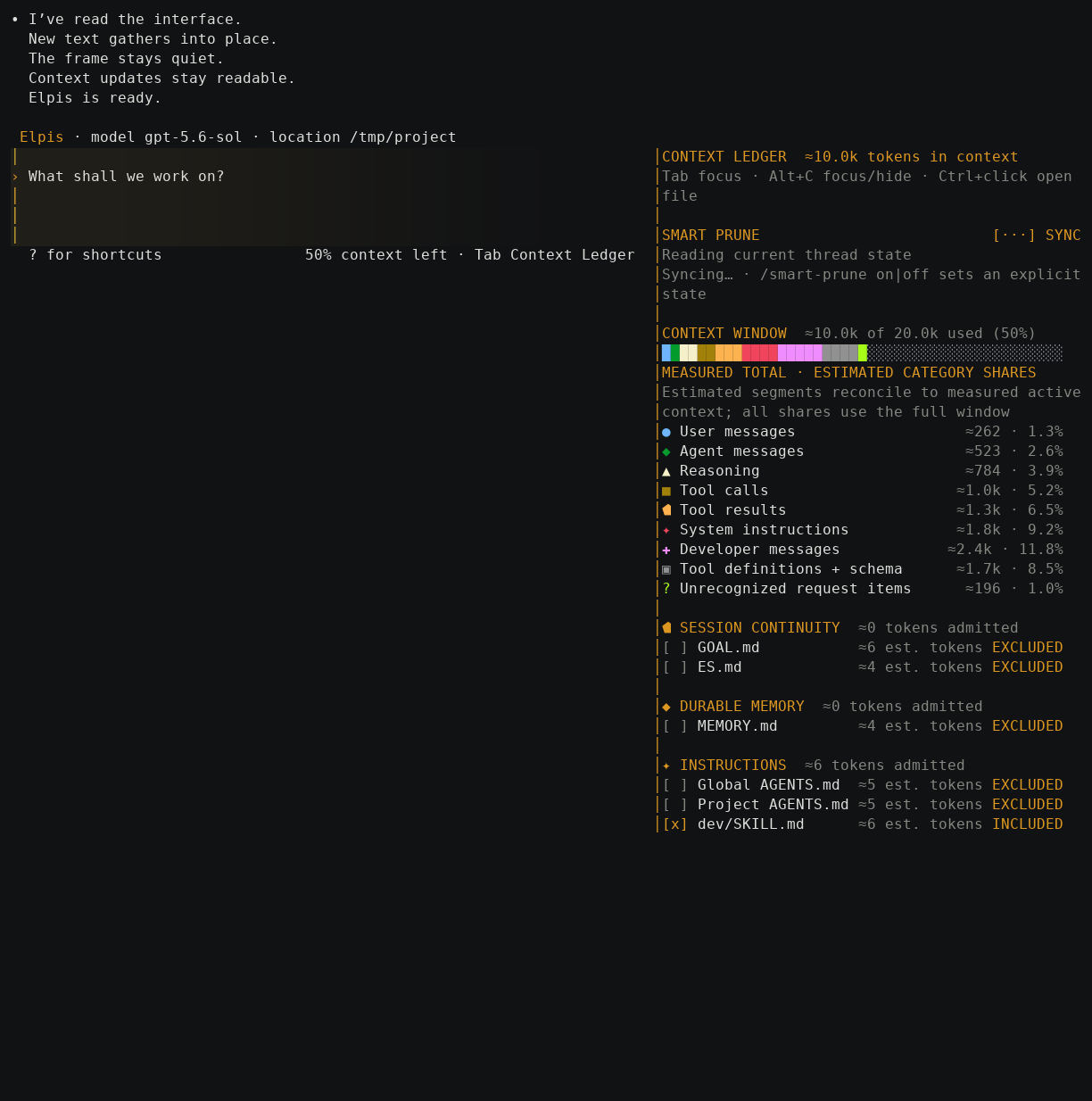
The Context Ledger (Tab; during an active turn, Alt+C always toggles it) lists admitted goals, rules, memory, and other portable sources with their byte sizes and capped character-derived estimates. Toggling a row writes admission.toml, which controls what the next turn receives.
Development rules are ordinary Markdown Ledger rows, not skills: newly discovered rules start included and an explicit exclusion persists. A nonempty configured development-rule root list replaces the managed fallback; an empty list uses it. Elpis leaves ordinary and bundled skills off by product default, while deliberate user configuration can enable a selected skill. Enabled skills expose compact metadata and keep their bodies lazy; /skills shows available candidates and their origins, but mentions and the model-visible list contain enabled skills only. The Ledger has no skills-catalog token row; its per-source estimates are not tokenizer measurements.
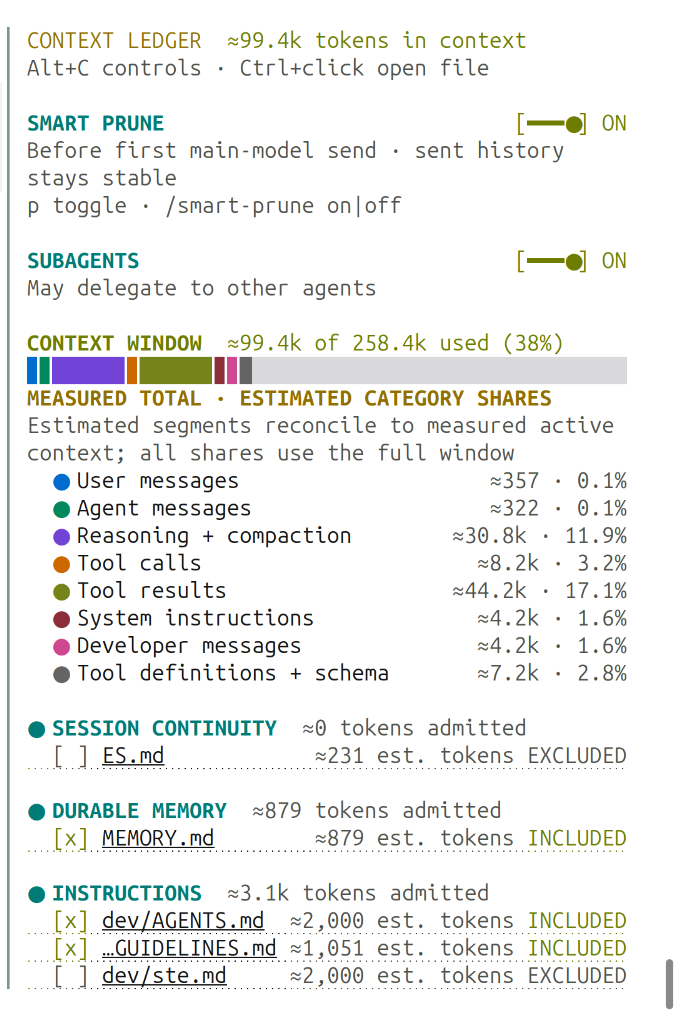
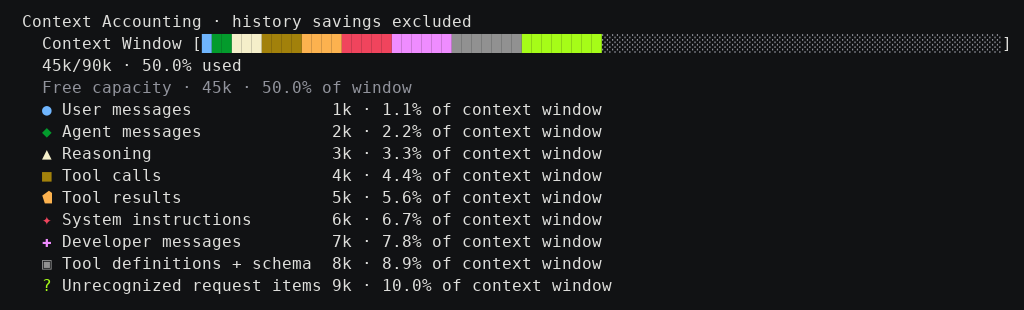
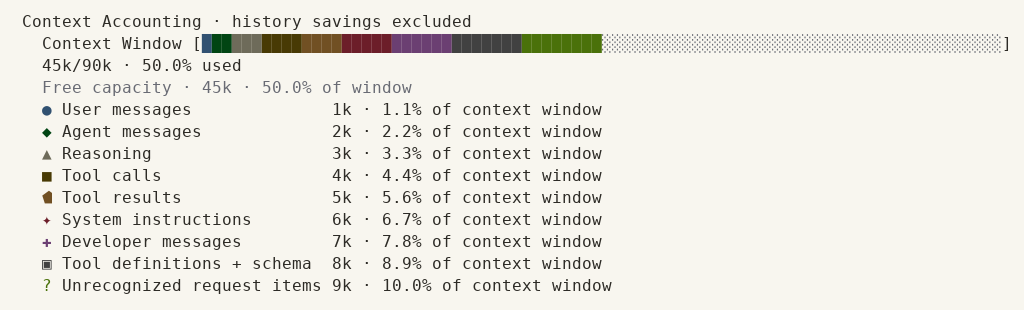
/context answers a different question: where the window went. It displays token usage by user messages, agent responses, tool calls, system prompt, Development rules, and free space, alongside available backtrack checkpoints.
Sessions and continuity
Keep the working context across model switches, compaction, and restarts:
GOAL.mdholds the current task. It is carried into each request, stays visible across compaction, and is editable during a run.ES.mdis an event-derived executive summary. It records modified files, commands run, blockers, and next steps, and is updated as the run progresses.- Exact resume continues an existing thread with its full history, using the provider-native session when one is available.
- Lean continuation starts a clean thread from the current
GOAL.md,ES.md, and active rules. This sheds old exploration without losing the objective.
Memory
Durable memory is one Markdown file, MEMORY.md, in the Elpis memory directory (derived from CODEX_HOME). The Context Ledger discovers it and lists it as a row, switched off until you admit it: like every optional row, memory does not reach the model unasked.
- One visible file. Plain text. Read it, edit it, commit it to git, or delete it.
- Admitted in the open. Because it is a Ledger row, you can always see whether memory reached the model, switch it on when you want it, and drop it when you do not.
- Retrieval beyond that file is your choice. Register an MCP server — for example rag-mcp-lancedb — and Elpis will use it.
Elpis previously ran an extraction, consolidation, and promotion pipeline. It was removed because it did not work: across two threshold settings it produced zero durable promotions, every sweep landing one recall short of the gate. Memory that rewrites itself in the background without appearing anywhere is the failure mode the Ledger row exists to prevent.
Deterministic work graphs
A coordinator can fan work out to several agents under an engine that validates the plan before anything runs. This is Elpis's own; it is not part of the Codex foundation.
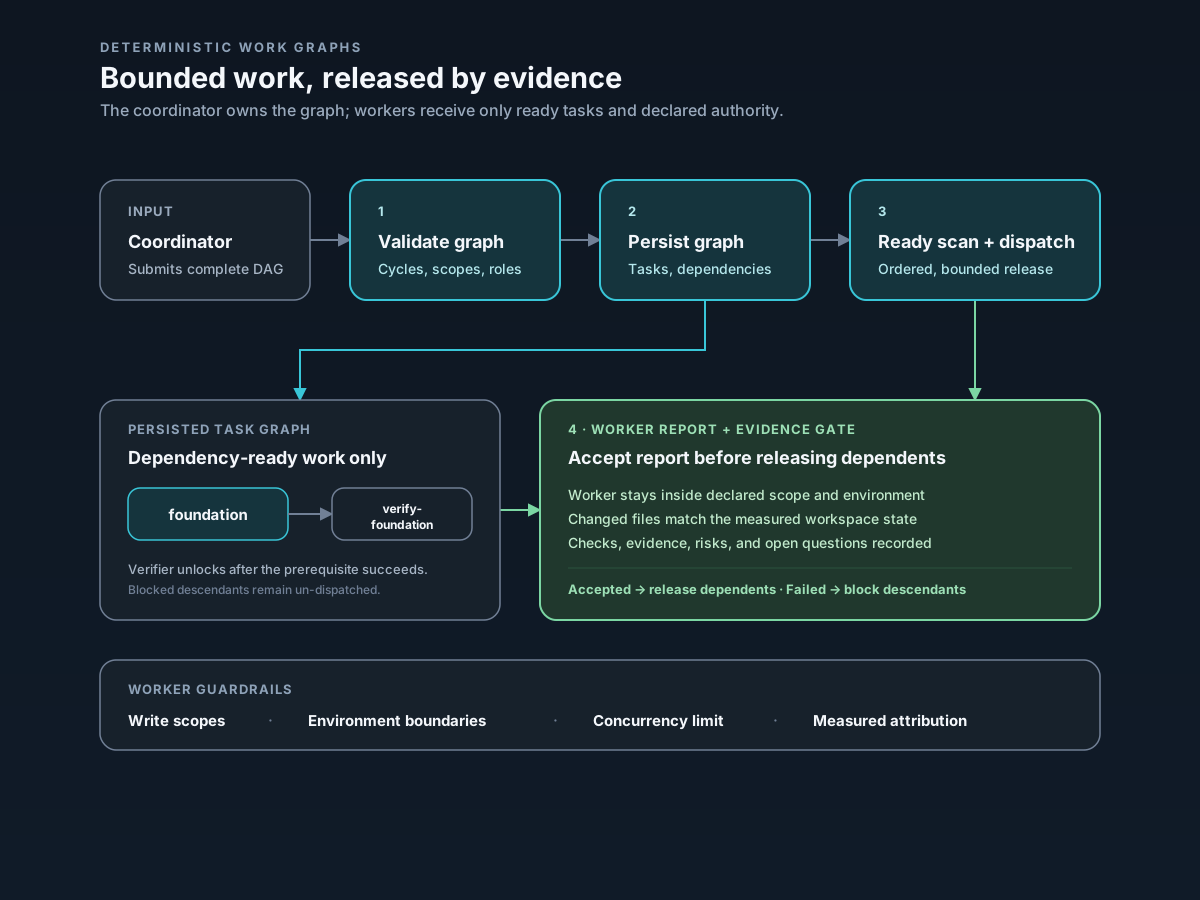
The coordinator submits a complete task graph — tasks, dependencies, write scopes, acceptance criteria, and environments. Elpis then owns the scheduling:
- Cycles cannot be scheduled. Kahn's topological algorithm proves the graph is acyclic and rejects it otherwise, so no worker is created for a plan that could only deadlock.
- Write conflicts are caught by construction. Path-prefix intersection detects overlapping write scopes, and all writable tasks in one environment are serialized even when their declared prefixes do not overlap.
- Verification is not optional. A writable task without a directly dependent
verifytask in the same environment is rejected before dispatch. - Evidence gates progress. Dependent work is released only after an accepted result; a failed, cancelled, or blocked prerequisite blocks its descendants.
Elpis never creates, merges, rebases, deletes, or pushes branches or worktrees. Preparing and integrating them stays coordinator-owned, because those operations change durable user state and deserve deliberate review.
Off by default. Enable with enable_fanout = true under [features]; there is no slash command. Full rules and the graph schema are in docs/WORK_GRAPHS.md.
Bring your own provider
Elpis is not tied to a single model vendor:
- OpenAI: GPT-4o, GPT-5.6-Luna, o1, o3, and compatible endpoints.
- Anthropic: Claude 3.5 Sonnet, Claude 3 Opus, Claude 3.5 Haiku.
- Google: Gemini 2.0 Flash, Gemini 1.5 Pro.
- Local & self-hosted: Ollama, vLLM, and any OpenAI-compatible server.
Switch models mid-session without restarting. The working context, goal, and session memory are preserved across provider boundaries.
Integrations and tools
Extend Elpis with external capabilities that stay in their own processes through MCP:
- Workspace retrieval: rag-mcp-lancedb provides local LanceDB/Tantivy search over your documents.
- Voice transcription: WhisperType provides local speech-to-text without adding its model/runtime dependencies to Elpis core.
Privacy and ownership
Telemetry is off by default and no analytics are uploaded unless you explicitly configure an exporter. Bring your own provider keys. Durable Elpis state is local files and SQLite that you can inspect, edit, export, or delete.
Evaluation status
The published evaluation reports three paired, byte-identical configured historical workloads with automatic pruning enabled under the superseded high-frequency setup, on gpt-5.6-luna (258,400 token context window).
RQ1: Context Reduction & Operating Hygiene
Across those configured historical runs, Elpis maintained working sets within safe operational thresholds.
Peak Context Utilization
In those configured historical runs, Codex expanded into the critical danger zone (>90% window) in every run, forcing 3 emergency compactions. Elpis maintained peak window utilization at 32.5–49.5%, achieving a 47–65% reduction in peak context footprint:
Input Token Distribution & Interquartile Stability
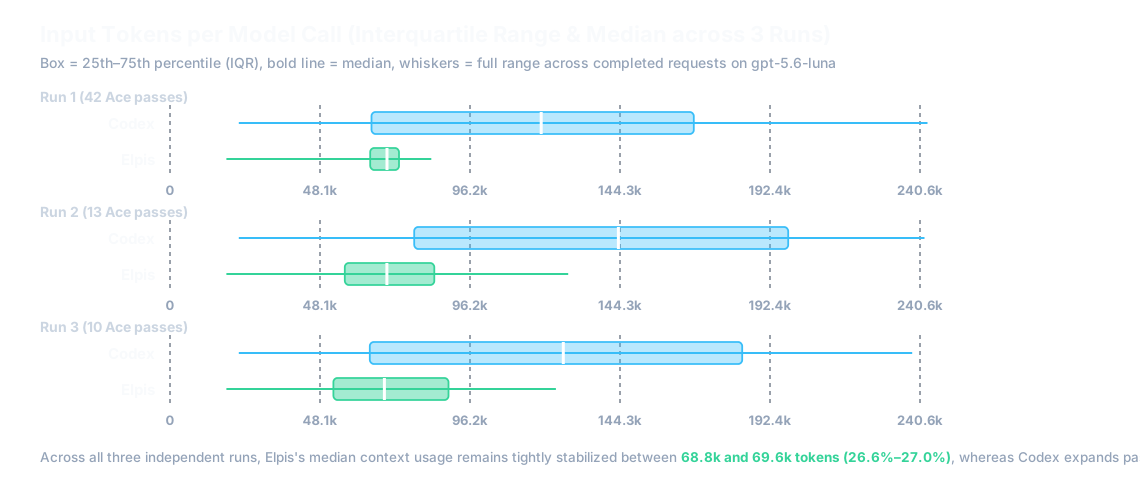
In those configured historical runs, Codex suffered wide distribution variance as transcripts accumulated, while Elpis tightly stabilized median token input at 68.8k–69.6k tokens (26.6%–27.0% of the window):
Trajectory Dynamics across Context Health Bands
When normalized across the request lifecycle (0% to 100% completion), Codex exhibits unbounded monotonic growth until emergency rollover occurs. The Elpis trace shown here is a configured historical run with automatic pruning enabled under the superseded high-frequency setup; it is not current default behavior:
Operating Zone Breakdown
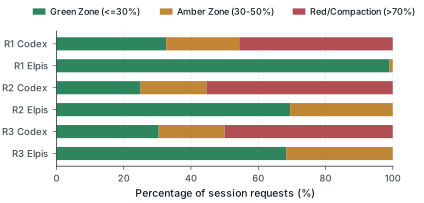
Across those configured historical requests, Elpis spent over 95% of its operating lifespan inside the safe and healthy bands, with zero requests entering the critical danger zone:
RQ2 & RQ3: Target Retention & Task Quality
- RQ2 (Information Retention): In benchmark audits testing recall of key file paths, schemas, and error signatures after pruning, 100% of tested targets (6/6) were retained intact in active context.
- RQ3 (Task Performance): Not established. The executed runs are incomplete and unreplicated, so they do not support a comparative correctness claim in either direction. No per-arm score is reported, and there is no evidence that pruning improves task completion or output quality.
RQ4: Pruning Overhead & Token Economics
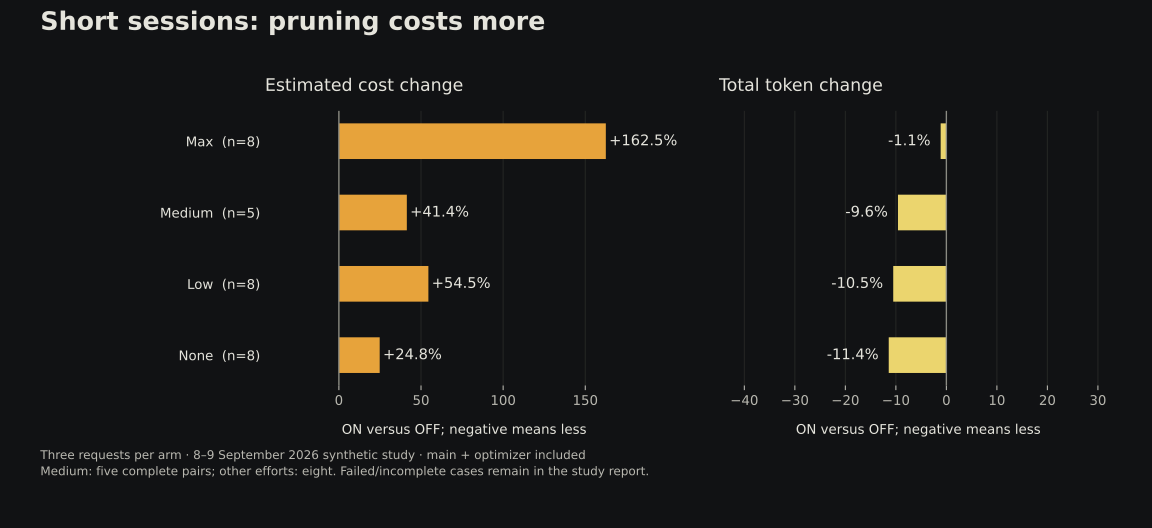
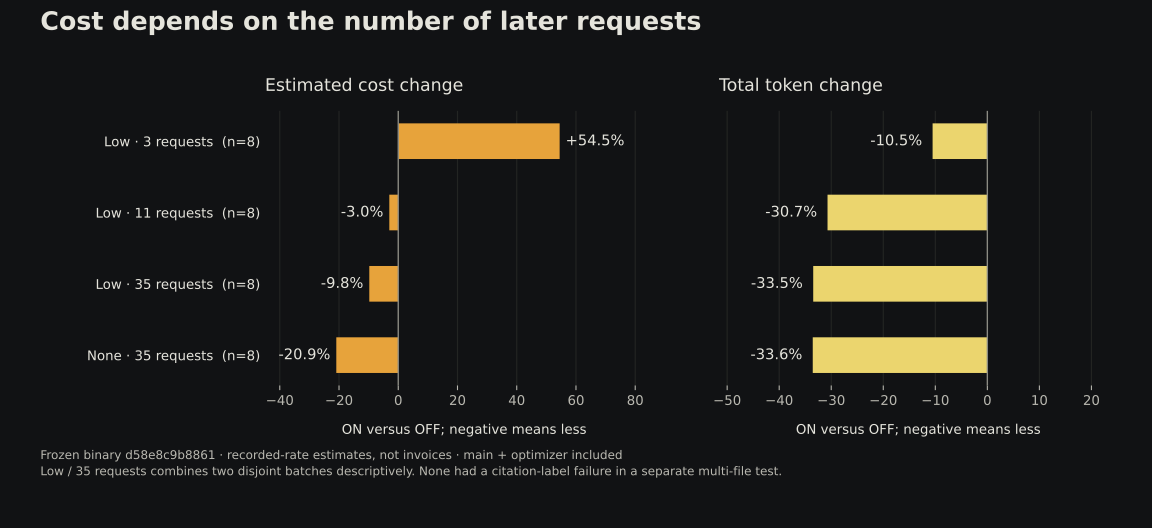
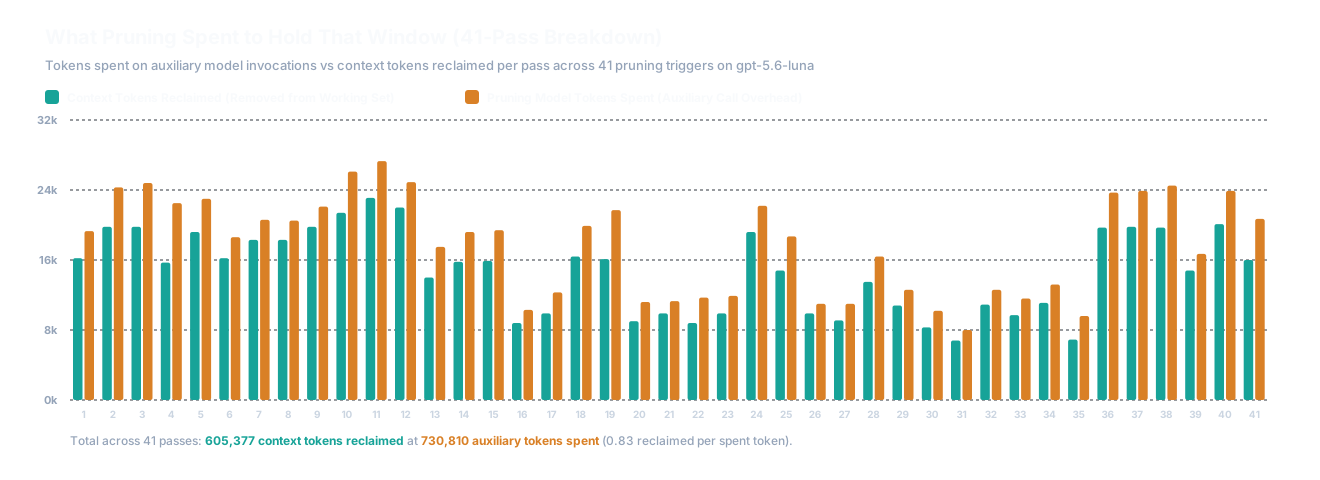
Pruning adds an auxiliary model call sequenced against the main agent, and rewriting history invalidates the provider's cached prefix. Both costs are real. The figures below are configured historical runs with automatic pruning enabled under the superseded high-frequency setup; they bound that configuration's penalty rather than describe the current default: 730,810 auxiliary tokens spent to reclaim 605,377 context tokens (0.83 reclaimed per spent token).
RQ5: Forensic Auditability
Every pruning event produces an immutable audit record on disk under ~/.elpis/logs/pruning/. In full forensic reconstruction evaluations, 7 of 9 properties were completely recoverable from disk, 2 partial, and 0 absent.
| Research Question | Empirical Finding |
|---|---|
| RQ1 — Context Efficiency | Historical superseded high-frequency setup: peak reduction of 47–65%; median context stabilized at 26.6–27.1% of the 258k window. |
| RQ2 — Information Retention | 6/6 tested post-prune targets preserved intact (100% retention). |
| RQ3 — Task Performance | Not established. The available runs do not support a comparative correctness claim. |
| RQ4 — Pruning Economics | Penalty established, current magnitude open. The measured figures describe a superseded high-frequency configuration. |
| RQ5 — Forensic Auditability | 7/9 properties fully recoverable from local rollout evidence; 0 lost records. |
Documentation
- Context and pruning — admission, lifetimes, pressure pruning, and audit records
- Sessions and continuity — exact resume, lean continuation,
GOAL.md, andES.md - Deterministic work graphs — plan validation, write scopes, concurrency, and evidence gates
- Providers — provider adapters, BYOK, and protocol limitations
- Evals & benchmarks — source data, procedures, scorers, and results
- Technical guide — product thesis, requirements, and architecture
- Research paper — technical preprint and formal specifications
License
Apache-2.0.
The execution foundation — terminal UI, patches, permissions, sandboxing, and sessions — derives from OpenAI's Apache-2.0 Codex CLI. Elpis extends that foundation with context admission and pruning, continuity checkpoints, auditable evidence, and provider control. Codex-derived source retains its upstream notices under codex-rs/.
Elpis Context Sovereignty & 4-Layer Pruning Pipeline
Elpis enforces Context Sovereignty: the principle that context is a strictly budgeted working set, not a dumped chat transcript. The user maintains live visibility and explicit control over every byte admitted to the agent's context window.
1. Systemic Role in Elpis
Context management acts as the primary gatekeeper between raw workspace/session events and the active model inference loop:
2. The 4-Layer Pruning Pipeline
Long agent sessions accumulate dead ends, voluminous search results, and repetitive file reads. Elpis separates working context from durable evidence.
Layer 3 is a single trigger, run as a gated cycle rather than continuously. An earlier "steady" trigger also fired on backlog size alone, independently of how full the window was; it was removed because it produced runs of tiny passes inside the healthy 20-30% band, and every pass discards the reusable prompt-cache prefix past its first rewritten item. The case it was meant to cover -- a single turn that balloons past the boundary without ever ending -- is already handled here, because the eligible region is cut by recency rather than at a turn boundary. See cache-friendly-pruning.md.
Pipeline Layer Comparison
| Layer | Trigger | Scope | Behavior | Failure Recovery |
|---|---|---|---|---|
| 1. RTK Filter | Tool execution | Shell output (rg, git status, find) |
Compacts raw command output using pattern filters before the agent sees it. | Fallback to unfiltered output on tool error. |
| 2. Safety Cap | Tool execution | All raw tool outputs | Hard-truncates exceptionally large output blobs to protect context limits. Inherited from Codex, unchanged. | Preserves header & footer with truncation notice. |
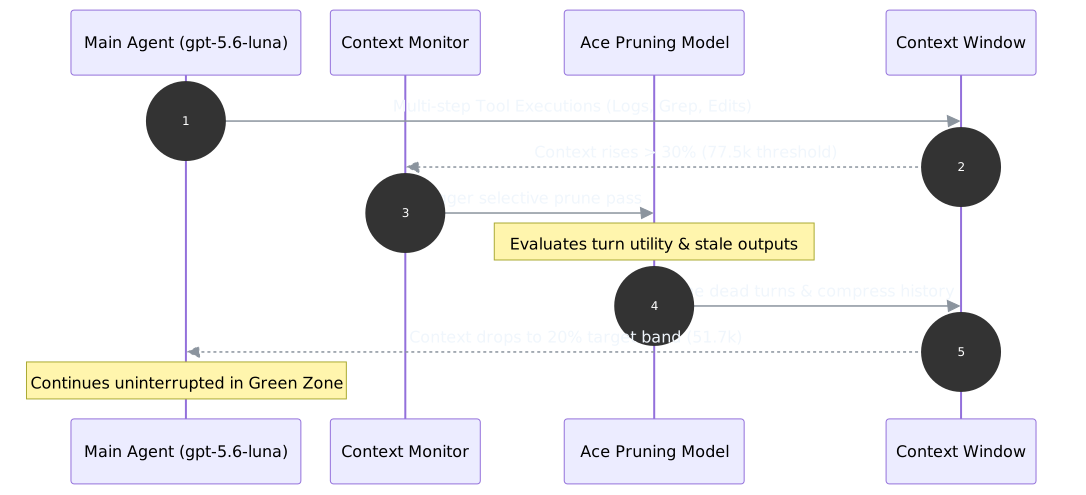
| 3. Ace Pressure Cycle | Exact model-window use reaches 30% (70% remaining), and a previous cycle has since been seen below 30% | Oldest eligible tool exploration, including the turn still running, but never a sealed epoch | Selects only enough old tool evidence to target roughly 20% use (80% remaining); the newest 10% of the window stays verbatim. Useful results become a compact conclusion plus an evidence pointer; dead ends leave working context entirely. It reaches into the current turn, because a single tool-driven turn can cross the boundary without ever ending. One cycle gets at most 2 Ace passes, spent back to back; the cycle then closes and cannot reopen until use has been measured below 30% and has climbed back to it. Each applied pass seals its region with an epoch marker that later passes may not touch. | A failed pass changes nothing. Once the cycle's 2-pass budget is spent, or when nothing reclaimable remains at this boundary, Elpis requests native compaction rather than let the window drift toward the model's hard limit. |
All three layers ship with Elpis. Layer 1 runs through RTK, which is a separate binary: scripts/install-elpis.sh installs it alongside Elpis (skip with ELPIS_SKIP_RTK=1), and on a launch that finds rtk on PATH with no ~/.elpis/hooks.json of your own, Elpis writes the PreToolUse hook that calls rtk hook claude. It then passes the normal startup hook review before it can run. An existing hooks.json is never modified, so {"hooks":{}} opts out permanently, and Elpis's hook runtime (codex-rs/hooks/src/events/pre_tool_use.rs) is what accepts RTK's rewrite response.
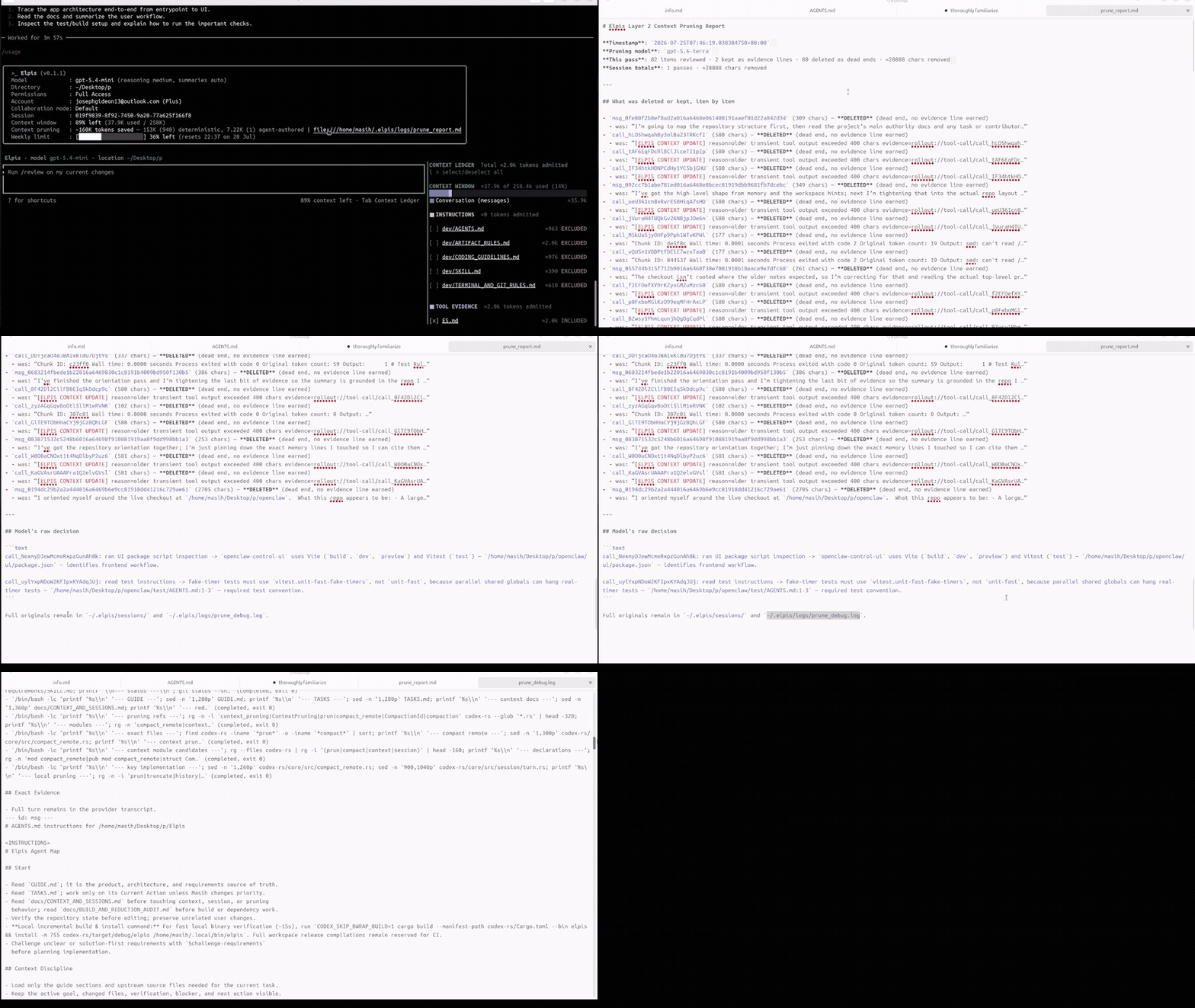
The Ace pass runs between model follow-ups as well as at the end of a turn, so one long-running tool-driven turn cannot skip the trigger. Each pass records which trigger fired (manual or pressure) in its manifest and report. OpenAI-backed passes use Luna at maximal reasoning effort (PRUNE_REASONING_EFFORT = ReasoningEffort::Max). Every successful pass immediately recomputes the working history estimate and writes prune_report.md alongside the session logs (codex-rs/core/src/session/context_prune_audit.rs). When a pressure pass runs during an active turn, it keeps the newest 10% of the window verbatim so the current follow-up observations remain intact while older evidence is pruned.
/prune runs the Ace pass on demand across eligible tool evidence from completed turns. It keeps user and assistant messages, the current turn, and durable rollout evidence. /compact is Elpis-owned conservative cleanup. It first runs the audited tool-evidence pass, then asks Luna Max to mark older whole conversation messages as KEEP or DELETE. The latest turn is protected; kept content is copied verbatim; incomplete, malformed, or uncertain decisions leave conversation history unchanged. A successful deletion starts a new window while the raw transcript remains intact. An explicit custom compact_prompt retains the upstream summary path as an opt-out. The Context Ledger's exact used-token number is authoritative after either path.
Ace pass audit trail
Every applied Ace pass writes an immutable audit before the working history changes. If that audit cannot be written, Elpis keeps the working history and does not record the pass as applied.
You do not have to go looking for these: prune_report.md renders ace.json and manifest.json as clickable links (context_prune_audit.rs). The audit deliberately omits the system prompt, skills, and transcript, so it stays readable.
3. Context Lifetimes
Every item admitted into Elpis context carries an explicit lifetime:
| Lifetime Tier | Scope & Source Files | Eviction & Survival Behavior |
|---|---|---|
| 1. Durable Lifetime | AGENTS.md rules, active GOAL.md, MEMORY.md, explicit user constraints |
Survives across compaction, model switches, and restarts. |
| 2. Task Lifetime | Standing decisions, modified files, blockers, ES.md checkpoint |
Survives across turns within the task; summarized into ES.md on task transition. |
| 3. Turn Lifetime | Terminal reads, searches, directory listings, build outputs, git diffs | Expires immediately after the active turn question is answered; raw output is preserved in disk logs (rollout:// evidence). |
- Durable: Survives across compaction, model switches, and restarts.
- Task: Survives across turn execution within the current task; summarized into
ES.mdupon task transition. - Turn: Expires immediately after the active turn question is answered. Raw output is evicted from working context, leaving behind an exact evidence pointer (rollout ID / log path).
4. Context Ledger (Tab / Alt+C) & admission.toml
Elpis provides interactive context admission control in the TUI:
- Context Ledger Panel (
TaborAlt+C): A side panel shown by default, listing every admitted portable context source with exact byte sizes and the percentage of the model context window in use. It is 52 columns wide, narrowing to a proportional slice on smaller terminals so the composer keeps room. While a turn is running,Tabdefers to the composer's queue-the-draft action;Alt+Calways toggles the ledger. admission.tomlControl: Toggling a row in the ledger writes~/.elpis/context/workspaces/<workspace>/admission.toml, which dynamically governs next-turn admission for:GOAL.md(Active Goal)ES.md(Executive Summary)- Global & project-level
AGENTS.mdrules - Individual portable development rules installed by Elpis (
~/.elpis/skills/dev/*.md)
Elpis embeds and installs its portable development rules on first launch and refreshes the managed files when the binary changes. The installed directory is the single default source; a project-sibling skills/dev is not scanned, so a development checkout cannot double-admit the same rules. Machine-specific additions remain opt-in through ELPIS_DEV_SKILLS_DIRS.

/context — where the window went
The ledger answers what is admitted. /context answers what filled the window: token usage as a grid broken down by category — user messages, agent responses, tool calls, system prompt, skills, and free space — alongside the backtrack checkpoints available via Esc Esc. The two are separate surfaces and neither replaces the other.

Context Accounting Contract
Elpis exposes one single source of truth for context measurement:
- Displayed percentages explicitly state whether they mean used or remaining.
- The percentage is computed against the model's own context window — used tokens over context window (
codex-rs/tui/src/chatwidget/context_ledger.rs) — never against transcript length. - It is reported in the Context Ledger. The persistent identity header carries product, model, and location only (
Elpis · model {model} · location {cwd}); the inherited footer status line is deliberately suppressed so there is exactly one place to read the number. /usageenumerates admitted sources, byte sizes, and lifetime reasons.
5. Systemic Inter-Dependencies
- Integration with Sessions: the admitted
GOAL.mdandES.mdsources are exactly what lean continuation carries into a fresh thread; see Sessions. - Integration with Memory: durable memory is a separate subsystem. It reads completed rollout transcripts from disk rather than hooking into compaction, so it does not depend on when a thread compacts. A
PreCompacthook event is available if you want to run your own work at that moment. - Integration with Providers: admitted context is normalized across provider wire formats while evidence pointers are preserved; see Providers.
Session Continuity
Elpis keeps work, goals, decisions, and evidence alive across restarts, model switches, and thread compaction without forcing the model to re-read an ever-growing transcript.
1. Two Continuation Modes
Elpis separates the model provider's native thread from its own provider-neutral session state, which gives two ways to continue work:
| Exact resume | Lean continuation | |
|---|---|---|
| What continues | The provider's native thread, with its accumulated history. | A fresh thread, re-anchored from portable checkpoints. |
| History source | Full native thread history (thread_id). |
GOAL.md + ES.md + applicable rule files. |
| Token footprint | Grows with raw turn history until compaction. | Bounded by the per-source character caps in codex-rs/core/src/elpis_context.rs. |
| Provider mobility | Bound to the originating provider thread. | Provider-neutral — the checkpoint is plain Markdown. |
| Evidence | Provider transcript on disk. | Provider transcript on disk, plus the checkpoint. |
Open decision. The threshold at which Elpis should switch automatically from exact resume to lean continuation is listed under Deferred Decisions in
GUIDE.md. Today the portable checkpoint is contributed to thread context on every thread start; there is no automatic tier-switching state machine.
2. How Lean Continuation Is Delivered
Continuity is a context contribution, not a separate replay path. ElpisContinuityExtension (codex-rs/app-server/src/extensions.rs) implements ContextContributor; on thread context assembly it calls build_continuity_prompt (codex-rs/core/src/elpis_context.rs) and injects the result as a separate developer prompt fragment.
build_continuity_prompt reads only the sources currently admitted in the Context Ledger, so anything you toggle off in the ledger stops being carried forward on the next turn.
3. Portable Checkpoint Layout
Portable session state lives independently of provider threads:
The <workspace> segment is a slug derived from the working directory plus a short hash, so separate checkouts never share a checkpoint.
GOAL.md
Written by write_goal (codex-rs/tui/src/elpis_context.rs):
# Elpis Goal
- Workspace: `/path/to/project`
- Thread: `<thread_id>`
- Status: <status>
- Updated: <unix_timestamp>
## Objective
<objective text>ES.md
Written by write_session_checkpoint in the same module, from the completed turn's own items — command executions and patch applications — rather than from a model-generated summary:
# Elpis Session Checkpoint
- Workspace: `/path/to/project`
- Thread: `<thread_id>`
- Turn: `<turn_id>`
- Status: <status>
- Updated: <unix_timestamp>
- Goal: [GOAL.md](GOAL.md) when present
## Latest Result
<final agent message for the turn, or "No final agent result was recorded.">
## Changed Files
- `path/to/file.rs` (modified)
## Commands
- `cargo test` (exit 0)
## Exact Evidence
- Full turn remains in the provider transcript.Both files are written to a temporary path and renamed into place, so a crash mid-write cannot leave a truncated checkpoint.
4. Failure Behavior
If writing ES.md fails, the turn still completes: Elpis logs a warning and surfaces Turn completed, but Elpis could not save ES.md: <error> in the transcript (codex-rs/tui/src/app/app_server_events.rs). Continuity degrades visibly rather than silently, but it does not abort the turn.
5. Related Surfaces
- Context admission — which checkpoint sources are carried forward is controlled in the Context Ledger; see Context.
- Memory — durable cross-session facts live in
MEMORY.md, switchable in the Context Ledger. - Providers — because checkpoints are plain Markdown, switching provider mid-task does not discard them; see Providers.
Elpis Memory Architecture
Elpis uses curated, size-bounded local memory to preserve recurring project knowledge and user preferences across sessions—without turning past conversation history into prompt baggage.
1. Overview & Core Philosophy
In Elpis, durable memory is distinct from session transcripts. While raw transcripts remain intact on disk as exact evidence, active context is kept small.
- Memory is curated: Only stable project facts, user preferences, standing decisions, and proven procedures enter long-term memory.
- Memory carries provenance: Every entry records its source thread and context.
- Recall is a discovery aid: Historical memory entries are treated as hypotheses. If a fact can drift or change, Elpis verifies it against the current workspace before relying on it.
What you control
Memory is off by default and yours to switch on. Three independent controls govern it, all reachable from /memories in the TUI:
| Control | Config key | Default | Effect when off |
|---|---|---|---|
| Memory subsystem | features.memories |
off | Nothing is extracted, consolidated, or recalled. The pipeline below never starts. |
| Recall | memories.use_memories |
on | Memory instructions are not injected into prompts; stored memory is not consulted. |
| Writing | memories.generate_memories |
on | New threads are recorded as memory_mode = "disabled" and never become memory candidates. |
Two further guarantees hold regardless of those settings:
- The agent has no memory-write tool. Dedicated memory tools are gated behind
memories.dedicated_tools, which defaults to off.MEMORY.mdis written by the phase-2 consolidation pass described below, not by the agent you are talking to. - Nothing is deleted without a trace. Faded and removed entries append to
archive.md, and if that write fails the operation is aborted rather than completed.
2. Two-Stage Memory Pipeline
Memory processing in Elpis operates in two distinct background stages:
Raw Transcript Rollout → Stage 1 Extraction (stores candidates & recall queries) → Phase 2 Consolidation (distills verified knowledge into MEMORY.md under a 6h cooldown).
Stage 1 (Extraction —
memory_stage1):- Extracts candidate memory items from raw thread rollouts.
- Stores normalized outputs in
stage1_outputs. - Tracks
usage_count,last_usagetimestamps, andstage1_recall_queries(thread_id, query_key, recalled_at)to measure recall frequency and query diversity.
Phase 2 (Global Consolidation —
memory_consolidate_global):- Attempts to run on each launch and stops unless the last success is more than 6 hours old and the candidate set changed.
- Marks a candidate promotable only when it clears both thresholds: recalled at least twice, across at least two distinct query contexts. There is no weighted score — the two conditions are absolute.
- Hands a sandboxed consolidation agent the changed inputs; that agent, not the pipeline, edits
MEMORY.md, and it is instructed to skip anything the thresholds marked ineligible.
Measured reality: on a live install this produced zero promotions in five days — 104 extractions, 60 candidates, no change to
MEMORY.md. The threshold was 3 recalls at the time and is now 2. Until a promotion is observed, treat this stage as unproven.
3. Data & File Layout
Elpis memory state is strictly separated from upstream runtime state and stored under ~/.elpis/:
| Path | Purpose | Behavior |
|---|---|---|
~/.elpis/memories/MEMORY.md |
Curated durable long-term memory. | Reaches the model through the Context Ledger, where it is listed and switchable like GOAL.md and ES.md. |
~/.elpis/memories/memory_summary.md |
Compact index of stored memory. | Injected into developer instructions when memory is on, capped at 2,500 tokens. This — not MEMORY.md — is what the pipeline puts in the prompt. |
~/.elpis/memories/raw_memories.md |
Every extracted candidate. | The journal. Grows unbounded until consolidation prunes it; 210 KB on a five-day-old install. |
~/.elpis/memories/archive.md |
Searchable append-only archive. | Receives deleted or age-faded memories prior to baseline reset. Fail-closed on write error. |
~/.elpis/state/memories_1.sqlite |
SQLite state database. | Stores stage1_outputs, stage1_recall_queries, job queues, and promotion metadata. |
~/.elpis/context/workspaces/<workspace>/GOAL.md |
Active goal checkpoint. | Survives restarts, model switches, and thread compaction. |
~/.elpis/context/workspaces/<workspace>/ES.md |
Session checkpoint, rewritten after each completed turn. | Records the turn's latest result, changed files, and commands run. See Sessions. |
4. Provenance & Live Workspace Re-Verification
Memory in Elpis is not treated as undeniable truth:
- Provenance: Every recalled memory item retains its original source attribution (
thread_id, timestamp, query key). - Workspace Re-Verification: When an entry describes workspace state (e.g., file paths, build flags, dependencies, or function signatures), Elpis treats the memory entry as a discovery pointer. Before making changes based on a recalled memory, Elpis inspects the live workspace to confirm the fact remains true.
5. How Memory Fits the Context Lifecycle
Memory fits into a strict 3-tiered context lifetime model:
Lifetime Scope Examples
--------------------------------------------------------------------------------------
durable Global rules & memory AGENTS.md, GOAL.md, MEMORY.md
task Active thread state ES.md, decisions, changed paths, verification
turn Transient exploration File reads, rg outputs, command execution- Post-Turn Pruning (Ace): After a turn finishes, transient
turn-level exploration (searches, directory listings, raw command outputs) is pruned from the next request, leaving only compact conclusions and evidence pointers. See Context. - Independent of compaction: Memory extraction reads completed rollout transcripts from disk, so it neither runs at compaction time nor depends on it. Transcripts are already durable evidence by the time stage 1 sees them.
- Fail-Closed Archive Reset: When resetting or pruning memory baselines, faded entries must append to
archive.md. If the archive write fails, the reset is aborted to prevent data loss (codex-rs/memories/write/src/workspace.rs).
6. Evals
Memory is judged by behavior, not by whether its plumbing runs. The eval plants a fact that appears nowhere except durable memory, runs a real turn against a mock model, and inspects the request that left for the model.
| Eval | Location | Proves |
|---|---|---|
| Recall | codex-rs/app-server/tests/suite/v2/memory_recall.rs |
A fact in MEMORY.md reaches the model, and switching MEMORY.md off in the Context Ledger removes it. |
The negative half carries the weight. A recall test that only checks the fact arrived passes just as well when every file on disk is admitted unconditionally — which is not memory working. Both halves have been verified to fail when the behavior they describe is broken.
Run it with:
CODEX_SKIP_BWRAP_BUILD=1 cargo test --manifest-path codex-rs/Cargo.toml \
-p codex-app-server --test all v2::memoryAny change to how memory is stored, promoted, or recalled must keep this eval passing, and a new memory behavior needs its own eval before the behavior is written.
7. Inspection & Verification
You can inspect and verify memory behavior using the following surfaces:
- Context & Memory Usage: Run
/usagein the TUI to see currently admitted memory sources, byte sizes, and reasons. - Context Ledger: The ledger sidebar is shown by default and toggles with
TaborAlt+C.MEMORY.mdis listed there from the start, likeGOAL.mdandES.md, so durable memory is visible and switchable without being added by hand. - Database Audit: Inspect
~/.elpis/state/memories_1.sqliteusing SQLite:SELECT thread_id, usage_count, datetime(last_usage, 'unixepoch') FROM stage1_outputs; SELECT thread_id, query_key, datetime(recalled_at, 'unixepoch') FROM stage1_recall_queries; - Archive Safety: Inspect
~/.elpis/memories/archive.mdto review historical faded or deleted memory entries preserved prior to baseline resets.
Provider-Neutral Architecture & Model Adapters
Elpis maintains a Provider-Neutral Architecture: Elpis owns context admission, durable memory, session continuity, permissions, tool execution, and the TUI interface. The selected provider owns inference.
1. Systemic Architecture
2. Supported Provider Routes & Protocols
| Provider ID | API Base URL | Credential Env Variable | Native Wire Protocol | Default Model |
|---|---|---|---|---|
openai |
https://api.openai.com/v1 |
OPENAI_API_KEY / OAuth |
OpenAI Responses API | gpt-5.4 |
openrouter |
https://openrouter.ai/api/v1 |
OPENROUTER_API_KEY |
OpenAI Responses Compatibility | openai/gpt-5.4 |
anthropic |
https://api.anthropic.com/v1 |
ANTHROPIC_API_KEY |
Anthropic Messages API | claude-sonnet-4-6 |
google-gemini |
https://generativelanguage.googleapis.com/v1beta |
GEMINI_API_KEY |
Gemini GenerateContent API | gemini-3.5-flash |
amazon-bedrock |
https://bedrock-mantle.us-east-1.api.aws/openai/v1 |
AWS credentials | OpenAI Responses API | openai.gpt-5.* model IDs |
ollama |
http://localhost:11434/v1 |
none | OpenAI Responses API | served locally |
lmstudio |
http://localhost:1234/v1 |
none | OpenAI Responses API | served locally |
ollama and lmstudio point at a local inference server, so no key is required and no request leaves the machine. Their port and base URL can be overridden with the experimental CODEX_OSS_PORT and CODEX_OSS_BASE_URL environment variables (codex-rs/model-provider-info/src/lib.rs).
2.1 Bring Your Own Key (BYOK) & Zero-API Local Testing
Elpis supports Bring Your Own Key (BYOK) across all major foundation providers and local engines. Setting environment variables or selecting model IDs dynamically switches active provider routing and UI display.
1. Bring Your Own Key (BYOK) Setup
- Anthropic / Claude:
export ANTHROPIC_API_KEY="sk-ant-..." elpis --model claude-3-7-sonnet-20250219 - OpenRouter (All Models / Universal Routing):
export OPENROUTER_API_KEY="sk-or-..." elpis --model anthropic/claude-3.7-sonnet - Google Gemini:
export GEMINI_API_KEY="..." elpis --model-provider google-gemini --model gemini-2.5-pro - OpenAI API Key:
export OPENAI_API_KEY="sk-proj-..." elpis --model gpt-4o
2. Testing UI Model Banner Without Paid API Keys
You can verify model switching, UI model banner rendering, and TUI state changes without an active paid API key using any of the following:
- Local Engines (Ollama / LMStudio - No API Key Required):
elpis --model-provider ollama --model llama3 # or elpis --model-provider lmstudio --model local-model - OpenRouter Free Tier Models:
elpis --model tencent/hy3:free - Interactive TUI Model Picker: Inside Elpis, type
/modelat any time to open the model & reasoning tier picker and verify that the active model name updates immediately in the upper header banner.
3. Provider Wire Protocol Translation
Elpis translates canonical turn objects into vendor-native HTTP payloads and translates vendor stream chunks back into unified ResponseEvent streams (codex-rs/core/src/chat_completions.rs):
| Canonical Elpis Event | OpenAI Responses | Anthropic Messages | Gemini GenerateContent |
|---|---|---|---|
| System Rules / Prompt | instructions / system |
system array |
systemInstruction object |
| User Message | user role item |
user role content block |
user role parts |
| Assistant Message | assistant role item |
assistant role content block |
model role parts |
| Tool Declaration | tools JSON schema |
tools JSON schema |
tools.functionDeclarations |
| Tool Call Output | function_call item |
tool_use block |
functionCall part |
| Tool Result Input | function_call_output |
tool_result block |
functionResponse part |
| Header Auth | Authorization: Bearer <key> |
x-api-key: <key> |
x-goog-api-key: <key> |
4. Compatibility Launcher Aliases
--provider accepts ten values in total: the direct routes openai, openrouter, anthropic, google-gemini, amazon-bedrock, ollama, and lmstudio, plus three compatibility aliases that route through OpenRouter:
| Launcher Command | Actual Provider | Model Target | Description |
|---|---|---|---|
--provider anthropic |
anthropic |
claude-sonnet-4-6 |
Direct Native Anthropic API routing |
--provider google-gemini |
google-gemini |
gemini-3.5-flash |
Direct Native Google Gemini API routing |
--provider claude |
openrouter |
~anthropic/claude-sonnet-latest |
OpenRouter compatibility route |
--provider gemini |
openrouter |
~google/gemini-pro-latest |
OpenRouter compatibility route |
--provider gemini-flash |
openrouter |
~google/gemini-flash-latest |
OpenRouter compatibility route |
5. Security & Authentication Isolation
- Credential Isolation: Credentials are read strictly from their designated environment variable (
OPENAI_API_KEY,ANTHROPIC_API_KEY,GEMINI_API_KEY,OPENROUTER_API_KEY). Native keys are never forwarded to OpenRouter or cross-contaminated. - Provider Switch Mobility: Switching providers (
/model) changes the active inference engine, but does not discard Elpis workspace context, GOAL.md, ES.md checkpoints, or memory state.
Anthropic sends its key only as x-api-key along with anthropic-version: 2023-06-01; Gemini sends its key only as x-goog-api-key; OpenAI and OpenRouter keep Authorization: Bearer.
6. Stream Translation Behavior
Beyond the request/response mapping above, the native adapters also translate streamed text, tool calls, vendor errors, token usage, model and version identifiers, and completion state back into the unified event stream. Dropping the response stream cancels the parser and releases the upstream response body, and provider stream-idle timeouts surface as stream errors.
The static native catalogs are supplied to the model manager, so /model uses the native provider's own default model instead of attempting an OpenAI /models request.
7. Honest Protocol Limitations
The native boundary rejects unsupported history and tool shapes rather than silently approximating them.
- Text and function tools are supported. Image inputs and image-bearing tool results are rejected, even though both vendors have image-capable APIs.
- OpenAI Responses-only items — encrypted reasoning state, remote compaction controls, custom/freeform tools, tool-search items, built-in web search, image generation, and namespace tools — are not translated.
- Vendor-native thinking/reasoning signatures, citations, prompt-cache controls, structured-output strictness, Anthropic server tools, and Gemini built-in tools/code execution are not preserved.
- Anthropic requests use an explicit
max_tokensof 8192, because the canonical request has no provider-neutral output-token limit. - Gemini emits only the first candidate. Repeated full function-call chunks are de-duplicated.
- The canonical completion event exposes
end_turn, not a raw vendor finish-reason. Known finish reasons are mapped explicitly; unknown ones remain unknown. A parsed tool call always maps toend_turn = false. - Native stream reconnection is not attempted after partial output. HTTP and SSE failures go to the existing provider error path.
- Live vendor acceptance of both native adapters is still pending.
8. Manual Smoke Tests
Anthropic:
export ANTHROPIC_API_KEY='...'
cargo run -p codex-tui --bin elpis -- --provider anthropic
# In the TUI: run /model and confirm Claude Sonnet 4.6 is listed, then ask for a simple
# answer and a task that invokes a local function tool.Gemini:
export GEMINI_API_KEY='...'
cargo run -p codex-tui --bin elpis -- --provider google-gemini
# In the TUI: run /model and confirm Gemini 3.5 Flash is listed, then exercise text and a
# function-tool turn.Compatibility route:
export OPENROUTER_API_KEY='...'
cargo run -p codex-tui --bin elpis -- --provider claude
# Confirm logs/config show model_provider=openrouter and the compatibility model alias.Do not run these on the maintainer's workstation; use the remote Rust workflow.
Workspace Retrieval
Semantic search over your own files — ask a question in plain language, get back relevant excerpts with their source paths, instead of reading files one at a time or loading a whole tree into the context window.
Elpis does not provide this. It lets you plug it in.
Retrieval means embedding models, a vector store, and — depending on the reranker — many gigabytes of weights. A Qwen reranker alone is around 8GB. None of that fits in a terminal binary, and none of it should be downloaded on a user's behalf. Elpis has no retrieval engine and no
/ragcommand; it has MCP, which is the general mechanism for exactly this.
How to add it
Register any MCP server that exposes a retrieval tool. ~/.codex/config.toml:
[mcp_servers.rag]
command = "/absolute/path/to/.venv/bin/python"
args = ["/absolute/path/to/server.py"]Restart Elpis and run /mcp to confirm it connected. From then on the agent calls it the way it calls any other tool — ask for what you want in plain language and name a folder if you want the search scoped.
rag-mcp is a ready-made local implementation: hybrid BM25 plus vector search with reranking, everything on-device, no API keys. Its readme carries the current setup steps. Any MCP server meeting the same contract works equally well, including one backed by a hosted embedding API — that choice, and its cost, is yours.
Why it is not built in
The engine used to live in this repository. It pinned PyTorch, which is roughly 2.5GB, and that single fact made retrieval unreachable from every binary install: you cannot ship it in a release artifact, and you cannot ask someone who ran a one-line installer to wait for a multi-gigabyte download. Moving the engine out did not reduce what Elpis can do — it moved the cost to the person who decides to pay it.
The rule that follows: never add a machine-learning dependency to this repository. See docs/SHIPPING_RULES.md.
What Elpis still owns
- Context pruning — excerpts a retrieval tool returns are tool output like any other, so they are pruned after the turn rather than accumulating (see context.md).
- Memory — durable memory may record a useful query or search strategy, never the retrieved document bodies (see memory.md).
- Startup — an MCP server runs in its own process. Its imports, model loading, and indexing cost cannot reach the TUI's launch path no matter how heavy the engine is.